Programming Keys is blog for all Programming and technology related articles

Showing posts with label c#. Show all posts

Tuesday, January 30, 2018

Get all jobs and triggers details in Quartz.NET 3.0

in my Previous article I have explained how we can create jobs and triggers dynamically.in this article i will show you how we can get all running jobs and triggers in quartz.net 3.x

using Quartz;
using Quartz.Impl;
using Quartz.Impl.Matchers;

    class Program
    {
            var allTriggerKeys = scheduler.GetTriggerKeys(GroupMatcher<TriggerKey>.AnyGroup());
            foreach (var triggerKey in allTriggerKeys.Result)
            {
             var triggerdetails =   scheduler.GetTrigger(triggerKey);
             var Jobdetails = scheduler.GetJobDetail(triggerdetails.Result.JobKey);

                Console.WriteLine("IsCompleted -" + triggerdetails.IsCompleted + " |  TriggerKey  - " + triggerdetails.Result.Key.Name + " Job key -" + triggerdetails.Result.JobKey.Name);
           
            }
}

kindly refere my Previous article for more understanding
Share:

Monday, January 29, 2018

Quartz.NET 3.0.2 Create Triggers and jobs dynamically

Quartz.NET is a pure .NET library written in C# and is a port of very popular open source Java job scheduling framework. let's see how we can create Triggers and jobs dynamically

using Quartz;
using Quartz.Impl;
using System;
using System.Collections.Generic;
using System.Linq;
using System.Text;
using System.Threading.Tasks;

namespace ConsoleApplication2
{
    class JobsAndTriggers
    {
        public string jobIdentityKey { get; set; }
        public string TriggerIdentityKey { get; set; }
        public string jobData_MethodName { get; set; }
        public int ScheduleIntervalInSec { get; set; }
    }
    class Program
    {
        static void Main(string[] args)
        {
           List<JobsAndTriggers> LstobjJobsAndTriggers = new List<JobsAndTriggers>();
            LstobjJobsAndTriggers.Add(new JobsAndTriggers { jobIdentityKey = "JOB1", TriggerIdentityKey = "TRIGGER1", jobData_MethodName = "JOB1_METHOD()", ScheduleIntervalInSec = 5 });
            LstobjJobsAndTriggers.Add(new JobsAndTriggers { jobIdentityKey = "JOB2", TriggerIdentityKey = "TRIGGER2", jobData_MethodName = "JOB2_METHOD()", ScheduleIntervalInSec = 10 });


            TestDemoJob1(LstobjJobsAndTriggers).GetAwaiter().GetResult();

            Console.ReadKey();

        }
        public static async Task TestDemoJob1(List<JobsAndTriggers> lstJobsAndTriggers)

        {

            IScheduler scheduler;
            IJobDetail job =null;
            ITrigger trigger = null;

            var schedulerFactory = new StdSchedulerFactory();

            scheduler = schedulerFactory.GetScheduler().Result;

            scheduler.Start().Wait();

            foreach(var JobandTrigger in lstJobsAndTriggers)
            {

          //  int ScheduleIntervalInSec = 1;//job will run every minute

            JobKey jobKey = JobKey.Create(JobandTrigger.jobIdentityKey);


             job = JobBuilder.Create<DemoJob1>().
                WithIdentity(jobKey)
                .UsingJobData("MethodName", JobandTrigger.jobData_MethodName)
                .Build();


                trigger = TriggerBuilder.Create()

                .WithIdentity(JobandTrigger.TriggerIdentityKey)

                .StartNow()

                .WithSimpleSchedule(x => x.WithIntervalInSeconds(JobandTrigger.ScheduleIntervalInSec).WithRepeatCount(1)
               // .RepeatForever()
                )

                .Build();

                await scheduler.ScheduleJob(job, trigger);

            }


        }
    }
    public class DemoJob1 : IJob

    {

        public Task Execute(IJobExecutionContext context)

        {

            //simple task, the job just prints current datetime in console

            //return Task.Run(() => {

            //    //Console.WriteLine(DateTime.Now.ToString());

            //});
            JobKey key = context.JobDetail.Key;

            JobDataMap dataMap = context.JobDetail.JobDataMap;

            string MethodName = dataMap.GetString("MethodName");
            Console.WriteLine(DateTime.Now.ToString() +" "+ MethodName);

            return Task.FromResult(0);

        }

    }
}

Share:

Thursday, September 14, 2017

ORA-00001: unique constraint entity framework 6 code first approach

ORA-00001: unique constraint entity framework 6


Solution : - 
The solution is to grant user both: 
'CREATE SEQUENCE' and 
'CREATE TRIGGER' 
permissions and re-create the schema.


Share:

Wednesday, September 13, 2017

Custom ASP.NET Session State Management with Redis

Custom ASP.NET Session State Management with Redis 


What is Redis?

 Redis is an open source key value data structure store. keys can be strings, hashes, lists, sets, sorted sets etc. This in memory data store is broadly used in session state storing and caching.

Steps to Implement redis session 

1 – Install MSI PACKAGE On Server (Download link) 

2 – GO TO  C:\Program Files\Redis

3-  Open - redis.windows.conf  and redis.windows-service.conf

4 – Add server ip to Config files(10.100.30.16)

 ex – bind 127.0.0.1 10.100.30.16 ::1

5- Install RedisSessionStateProvider from Nuget Manager(Client Machine) 


6- Web.config (Client Machine) - 

<sessionState mode="Custom" customProvider="MySessionStateStore">
      <providers>
<add name="MySessionStateStore" type="Microsoft.Web.Redis.RedisSessionStateProvider" host="10.100.30.16" port = "6379" accessKey="" ssl="false" />
      </providers>

    </sessionState>

Share:

Friday, September 8, 2017

ORA-00904 invalid identifier entity framework 6 migration oracle 12c

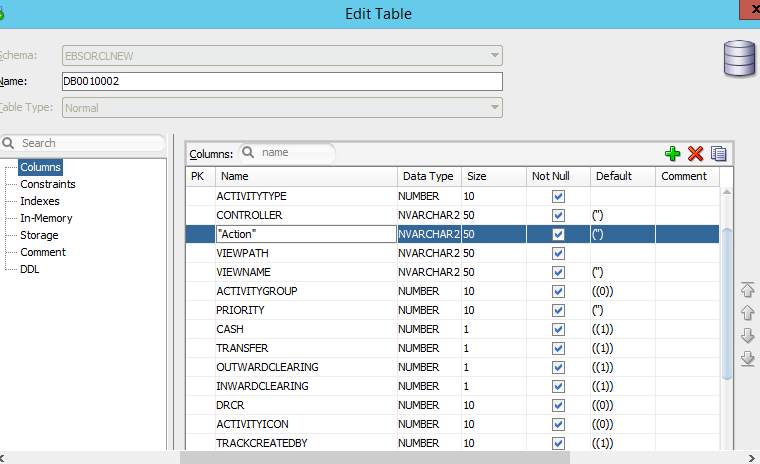
ORA-00904 invalid identifier

this issue is caused because of we have used oracle keyword in column name. check below image

Action is keyword in oracle. this is the reason oracle appends "" double quotes in column name. 

Solution : - 
Just remove the double quotes and rename column name in Capitalize letters.


Share:

ORA-01407: cannot update to NULL EF 6 Oracle 12c Migration

ORA-01407: cannot up date to NULL


1 - Solution :- 
If we pass "" (blank) value in model. ef will throw error. pass "." or blank space ( )
to avoid this error.

2- Solution :- Set Default value to column
Share:

How to Encrypt Web config in asp.net mvc

1.      Create RSA key container (Development machine).
a.       Run CMD as Administrator

2.      Export the RSA key container (Development machine).

3.      Prepare the web.config file for encryption (Development machine).
a.        Add the following code to the web.config file as a child of the <configuration> node
    <providers>
      <add name="Neorithm" type="System.Configuration.RsaProtectedConfigurationProvider,&#xD;&#xA;          System.Configuration, Version=2.0.0.0, Culture=neutral, PublicKeyToken=b03f5f7f11d50a3a,&#xD;&#xA;          processorArchitecture=MSIL"
      keyContainerName="InternetBanking"
      useMachineContainer="true"/>
    </providers>
  </configProtectedData>

4.       Encrypt the web.config file (Development machine).
a.       For connectionStrings
b.       For appSettings

The following steps will be performed on each machine where your web-app will be deployed.
5.      Import the RSA Key container into the machine. (Deployment machine)
Copy the “keys.xml” file to the machine where the app needs to run. Run the following command to import the keys:
To Decrypt Web.Config


To Encrypt –

C:\Windows\Microsoft.NET\Framework\v4.0.30319>aspnet_regiis -pef "appSettings" "E:\Model\EBS" -prov "Neorithm"


Share: