Programming Keys is blog for all Programming and technology related articles

Showing posts with label oracle. Show all posts

Thursday, September 14, 2017

ORA-00001: unique constraint entity framework 6 code first approach

ORA-00001: unique constraint entity framework 6


Solution : - 
The solution is to grant user both: 
'CREATE SEQUENCE' and 
'CREATE TRIGGER' 
permissions and re-create the schema.


Share:

Wednesday, September 13, 2017

ORA-30673: column to be modified is not an identity column oracle 12c

ORA-30673: column to be modified is not an identity column

Answer : - 

Currently orcle 12c does not support modifying an existing column as IDENTITY column 

Solution : - Solution is to add a new column and then drop the existing one

ALTER TABLE Tablename ADD (ColumnName_NEW NUMBER(3) GENERATED ALWAYS AS IDENTITY);
Share:

Custom ASP.NET Session State Management with Redis

Custom ASP.NET Session State Management with Redis 


What is Redis?

 Redis is an open source key value data structure store. keys can be strings, hashes, lists, sets, sorted sets etc. This in memory data store is broadly used in session state storing and caching.

Steps to Implement redis session 

1 – Install MSI PACKAGE On Server (Download link) 

2 – GO TO  C:\Program Files\Redis

3-  Open - redis.windows.conf  and redis.windows-service.conf

4 – Add server ip to Config files(10.100.30.16)

 ex – bind 127.0.0.1 10.100.30.16 ::1

5- Install RedisSessionStateProvider from Nuget Manager(Client Machine) 


6- Web.config (Client Machine) - 

<sessionState mode="Custom" customProvider="MySessionStateStore">
      <providers>
<add name="MySessionStateStore" type="Microsoft.Web.Redis.RedisSessionStateProvider" host="10.100.30.16" port = "6379" accessKey="" ssl="false" />
      </providers>

    </sessionState>

Share:

Friday, September 8, 2017

ORA-00904 invalid identifier entity framework 6 migration oracle 12c

ORA-00904 invalid identifier

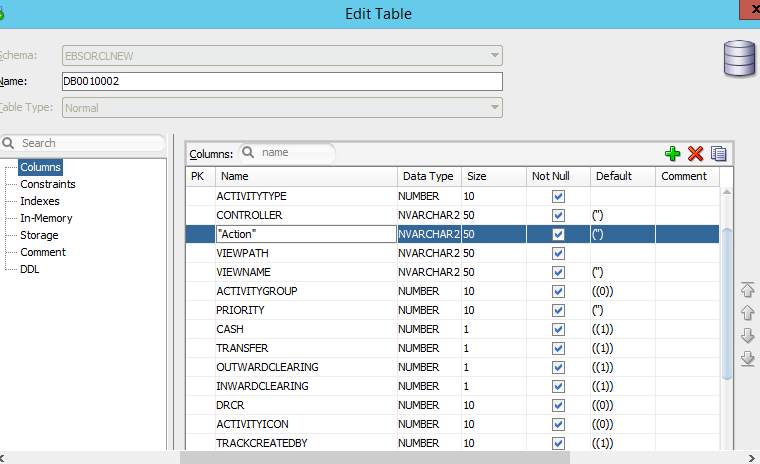
this issue is caused because of we have used oracle keyword in column name. check below image

Action is keyword in oracle. this is the reason oracle appends "" double quotes in column name. 

Solution : - 
Just remove the double quotes and rename column name in Capitalize letters.


Share: